But getting something to work is not the same as building something that is actually good.
That's where I think many AI-built websites and web apps are missing a layer.
I don't just think about the interface.
I think about the whole digital solution.
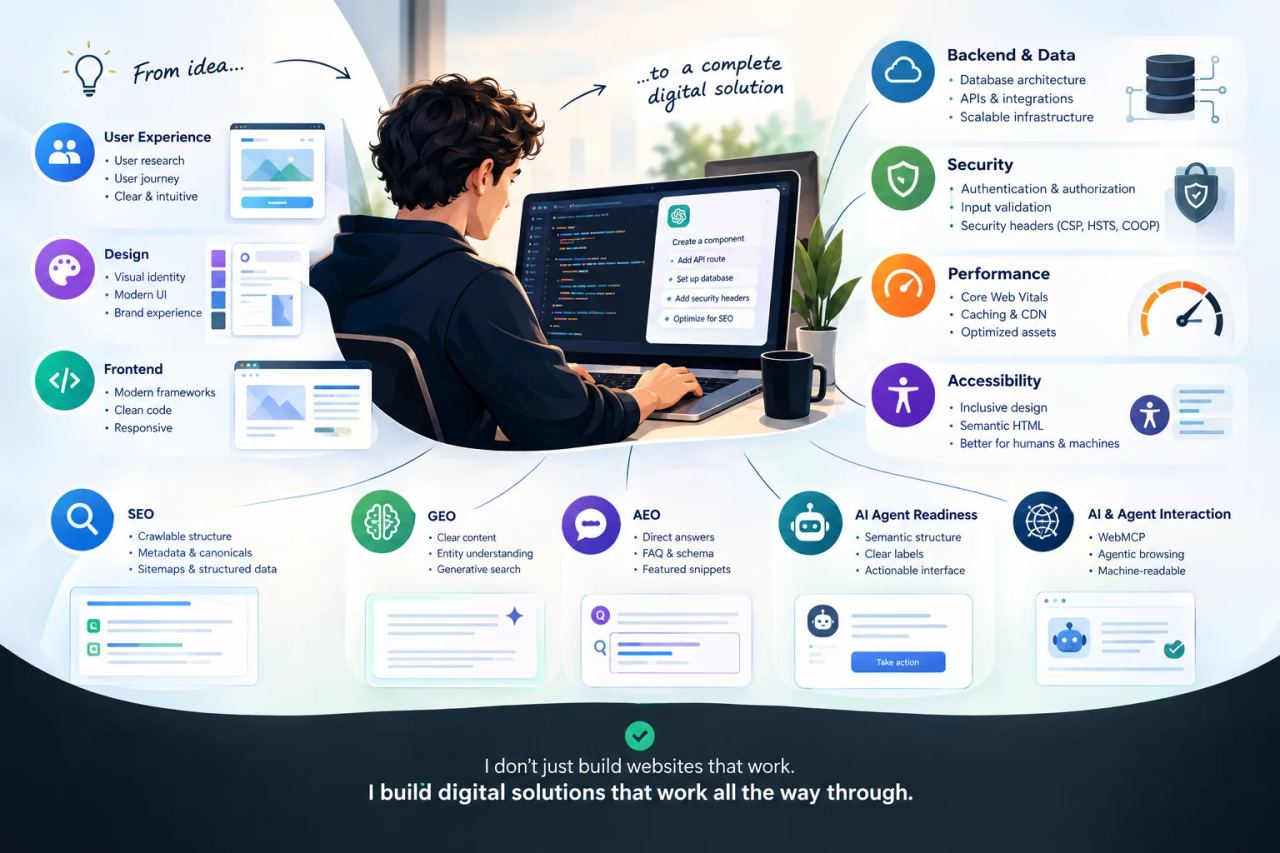
From user experience and visual design to functionality, data, backend architecture, security, performance, SEO, GEO, AEO and the emerging world of AI agents.
The code is only one part of it.
I don't design the front end and bolt the technology on afterwards
My starting point is usually the experience.
What is the user trying to achieve?
What should be obvious?
What should happen when they click, search, submit, create, edit or buy something?
What information does the system need?
What needs to happen in the backend?
And what should happen if something goes wrong?
That thinking affects everything that comes afterwards.
The interface, navigation, database structure, API design, authentication, permissions, error handling, performance and even the way content is exposed to search engines and AI systems are all parts of the same product.
This is the difference between thinking of a website as a design project and thinking of it as a digital product.
A modern website has several audiences
A website has always had to work for people.
Now it increasingly has to work for machines too.
A person needs to understand the interface.
A search engine needs to discover and index the content.
An AI system needs to understand what the content means.
An AI agent may eventually need to navigate the interface and perform actions.
That creates several layers of optimization.
UX: Can a human understand and use it?
Performance: Can it respond quickly and remain stable?
**SEO: Can search engines discover, understand and index it?
GEO: Can the content be understood and surfaced in generative search experiences?
AEO: Can a system identify clear answers to specific questions?**
Agent readiness: Can an AI agent understand and interact with the interface?
Google's current guidance is actually quite useful here. Google states that SEO fundamentals remain relevant to generative AI search because those experiences are built on its existing Search systems. It also explicitly discusses AEO and GEO, while warning against treating them as collections of magic hacks.
"Google: Optimizing your website for generative AI features" (https://developers.google.com/search/docs/fundamentals/ai-optimization-guide)
For me, this is not six separate jobs.
It is one job viewed from six different angles.
KodeKid is my proof of concept
I built "KodeKid" (https://www.kodekid.app/) as a real project, but also as a place to test this way of thinking.
I documented the technical work here:
"Behind the site: KodeKid" (https://www.kodekid.app/behind-the-scenes)
The project uses Next.js, Supabase and Vercel, but the interesting part isn't the technology list.
It's what happens around it.
The site uses Schema.org / JSON-LD, individual metadata and canonical URLs, a controlled sitemap, security headers including CSP, HSTS and COOP, cached assets, accessibility considerations and several layers aimed at making the site understandable to both people and machines.
On 18 September 2026, the KodeKid site recorded 100 in Lighthouse SEO, 100 in Accessibility and 100 in Best Practices, alongside a 95 Performance score. I also tested its Agentic Browsing readiness using the Lighthouse CLI.
Those numbers are not the point.
The point is that I am actually building with these considerations in mind rather than adding them to a checklist at the end.
The backend is part of the user experience
A beautiful interface can hide a terrible system underneath it.
A form can look perfect but fail because the backend does not validate input correctly.
A dashboard can look fast while making inefficient database queries.
A login system can work while permissions are poorly designed.
A web app can expose functionality it was never intended to expose.
That's why I don't treat the backend as somebody else's problem.
I think about the data model, APIs, authentication, authorization, validation, storage, caching, errors and system behaviour as part of the product.
The user doesn't see the database.
But the user absolutely experiences the consequences of a bad one.
Security belongs in the architecture
The same applies to security.
Security isn't a little padlock icon added at the end of a project.
It starts with architecture.
What data is exposed?
Who can access what?
Where does authentication happen?
What happens to user input?
What can an API call do?
What happens if someone manipulates the request?
Which browser capabilities should be allowed?
On KodeKid, for example, I have implemented security-related headers including Content Security Policy, HSTS and COOP as part of the site rather than treating security as something separate from the frontend.
As websites become more accessible to AI agents, security becomes even more interesting.
Chrome's current WebMCP documentation explicitly addresses security considerations for agents operating through websites, including risks such as malicious instructions embedded in tool descriptions or third-party content.
"Chrome: WebMCP security" (https://developer.chrome.com/docs/ai/webmcp/secure-tools)
SEO starts before the content team arrives
SEO is often treated as something that happens after a website has been designed and developed.
I see it differently.
The technical structure determines how much of the site can actually be understood.
**Page titles.
Descriptions.
Canonical URLs.
Semantic HTML.
Internal links.
Sitemaps.
Structured data.
Rendering.
Performance.
Indexability.**
These decisions belong in the architecture.
Google's documentation on Search and structured data makes the same basic point: structured data can help Google understand the content and entities represented on a page.
"Google: Introduction to structured data" (https://developers.google.com/search/docs/appearance/structured-data)
On KodeKid, each page has its own metadata and canonical URL rather than simply inheriting everything from the front page. The content is also represented using Schema.org / JSON-LD.
That is not SEO decoration.
It is information architecture.
GEO and AEO are really about clarity
The current discussion around GEO and AEO can become unnecessarily complicated.
For me, the underlying idea is fairly simple:
Make it obvious what your website is about.
Make the important information accessible.
Make relationships between entities clear.
Answer relevant questions directly.
Don't bury essential facts inside a visual design that only makes sense to a human looking at the screen.
Google's own guidance says that generative AI search still relies heavily on foundational SEO practices such as crawlability, useful content, clear technical structure and good page experience.
"Google: Optimizing your website for generative AI features" (https://developers.google.com/search/docs/fundamentals/ai-optimization-guide)
So rather than chasing an "AI ranking trick", I'd rather build a website that is simply easy to understand.
That tends to be useful to everyone.
The web is becoming more machine-readable
This is perhaps the most interesting part.
AI systems are moving from simply reading websites towards actually using websites.
Chrome is developing WebMCP as a way for websites to expose structured tools that AI agents can use to perform actions. Websites can describe what an agent can do, what information it needs and how the action should be performed.
"Chrome: WebMCP" (https://developer.chrome.com/docs/ai/webmcp)
That changes the role of interface design.
A button is no longer only something a human sees.
A form is no longer only something a person fills out.
Navigation is no longer only a visual hierarchy.
The structure of the interface can become part of the language through which an AI agent interacts with a product.
Chrome's Agentic Browsing work even looks at things such as the accessibility tree, labels, interaction structure and layout stability when considering whether a website is suitable for agent interaction.
"Chrome: Agentic Browsing" (https://developer.chrome.com/docs/lighthouse/agentic-browsing/)
That makes good UX, semantic HTML and accessibility even more interesting.
What is good for people can also become useful to machines.
Performance is part of the product
I don't consider performance a Lighthouse number that you check five minutes before launch.
Performance affects the experience.
It affects interaction.
It affects conversion.
It affects accessibility.
And it is part of how Google evaluates page experience.
"Google: Understanding page experience" (https://developers.google.com/search/docs/appearance/page-experience)
That's why I look at things like Core Web Vitals, image delivery, caching, JavaScript, rendering and network behaviour while building the product.
And I prefer measured performance over assumptions.
On KodeKid, for example, the desktop and mobile measurements show a very different picture. Desktop LCP was measured at 1.5 seconds, while mobile LCP was 5.7 seconds. Rather than hiding the weak number, I documented it as something that needs improving.
That is how I prefer to work:
Measure it. Understand it. Improve it.
I don't believe AI replaces craftsmanship
AI has dramatically lowered the barrier to building software.
That's a good thing.
It means more ideas can become real products.
But it also means that more websites will be generated without anyone looking at the bigger system.
AI can write the component.
It can create the API route.
It can generate the database query.
It can suggest the security header.
It can write the SEO metadata.
It can even explain why everything is supposedly perfect.
Someone still needs to ask whether the pieces actually make sense together.
That's the part I enjoy.
From vibe coding to product thinking
So when I say that I build with AI or use vibe coding, I'm not really talking about a replacement for traditional development.
I'm talking about a different way of getting from idea to product.
AI gives me speed.
Design gives me direction.
Development gives me control.
Backend architecture gives the product substance.
Security gives it boundaries.
SEO makes it discoverable.
GEO and AEO make the information easier to understand in an increasingly generative search environment.
Accessibility makes the experience usable by more people and gives machines a clearer representation of the interface.
And emerging technologies such as WebMCP point towards a web where AI agents can interact directly with digital products.
I think about all of those things as parts of the same problem.
The real question isn't "Was it vibe coded?"
The interesting question is:
What did you build?
Does it solve a real problem?
Is the experience clear?
Does the functionality make sense?
Is the backend robust?
Is the data protected?
Is it fast?
Is it accessible?
Can Google understand it?
Can an AI system understand the content?
Can an AI agent eventually interact with it?
That's the standard I am interested in.
Vibe coding is simply one of the tools I use to get there.
I don't just build websites that work.
I build digital solutions that work all the way through.
Author: Lars Sohl, founder of Klokly.app and KodeKid