What I built
Rendering a Blender animation frame by frame on one computer can take a surprisingly long time.
The idea behind Mr. Blender Render was simple: why not use the computers that are already sitting around doing nothing?
The application provides a central render queue where a job can be added and the available machines can be assigned to the task.
Each Node connects to the main application and waits for work. When a frame becomes available, a Node claims it, renders it and reports the result back to the main application. This makes it possible for machines with very different performance levels to work together.
A fast workstation can process more frames while a slower laptop simply contributes what it can.
There is no requirement for every machine to have the same hardware.
One render job. Multiple computers.
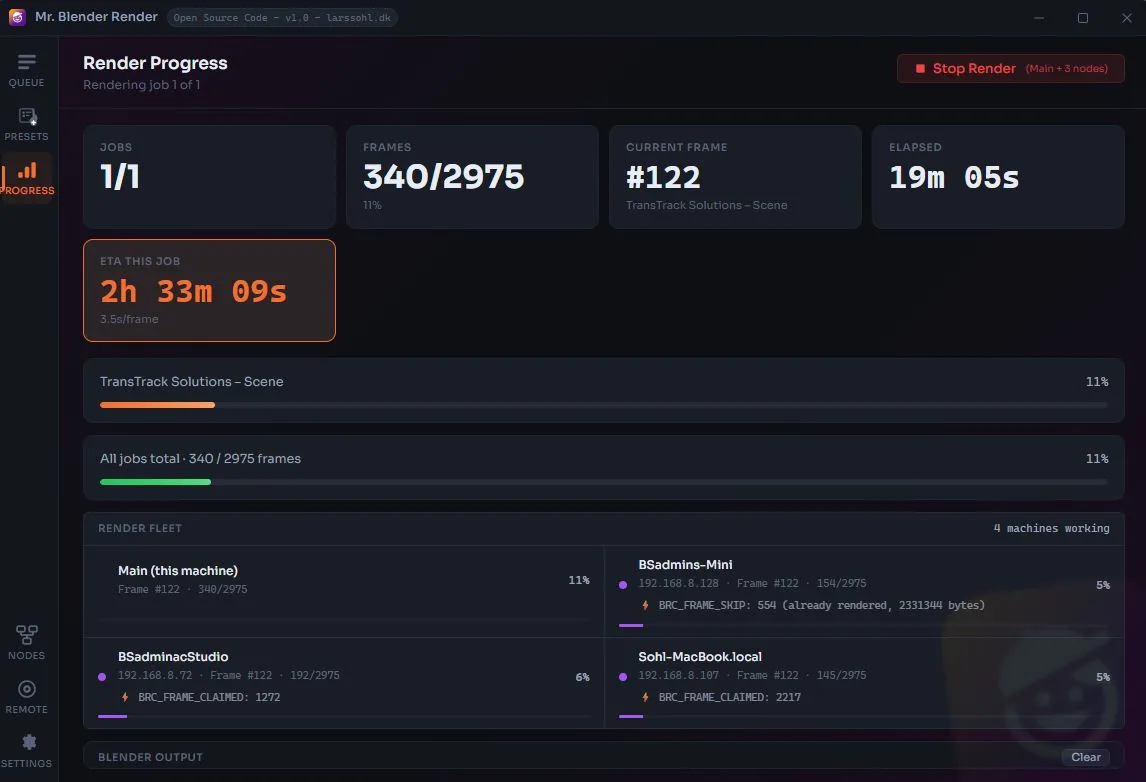
The main interface provides an overview of the entire render operation:
Render Queue
Add and manage Blender rendering jobs.
Frame Distribution Frames are automatically distributed between connected Nodes.
Mixed Hardware PCs and Macs can participate in the same render job.
Live Progress Monitor the current frame, total progress, elapsed time and estimated remaining time.
Node Monitoring See which machines are working, which frame they are rendering and how much work they have completed.
Local Rendering The actual rendering takes place on the connected machines rather than on a remote cloud service.
Scalable at home or in a studio Adding another computer simply adds another potential rendering machine.
Built and stress-tested with real machines
I have tested the system with a mixed fleet of three Macs and two PCs, all with different hardware configurations and different rendering performance.
That was an important part of the project.
A render farm should not assume that every machine is identical. In a real studio, you might have a powerful workstation, an older desktop, a MacBook and a machine that is only occasionally available.
Mr. Blender Render is designed around exactly that scenario.
The machines do not need to finish frames at the same speed. They simply take available work when they are ready.
Why build a private render farm?
Cloud rendering is useful, but sometimes the fastest computer available is already sitting next to you.
A private render farm can make use of existing hardware that would otherwise be idle.
For a long animation, even relatively modest additional rendering capacity can make a noticeable difference. Instead of asking one GPU to render 2,975 frames, for example, the workload can be distributed across several machines.
The application therefore sits somewhere between a traditional single-machine Blender workflow and a full commercial render farm.
It is intentionally small, local and practical.
How Mr. Blender Render works
A typical workflow looks like this:
1. Create the Blender project Prepare the scene and animation as you normally would in Blender.
2. Create a render job The main application adds the animation to the render queue.
3. Connect the Nodes Other PCs and Macs on the network run the Node application.
4. Distribute the frames Available Nodes claim frames from the queue.
5. Render in parallel Each machine renders its assigned frame using its own Blender setup and GPU.
6. Report the result Completed frames are reported back to the main application.
7. Repeat until finished As soon as a machine finishes, it can pick up another frame.
The important part is that the machines do not need to work in lockstep. They simply keep taking work from the queue.
From render queue to render farm
One of the interesting parts of this project was that the basic idea is actually quite simple.
A render farm does not necessarily need to be a giant datacenter.
At its core, the problem is:
How do you make several computers work on the same sequence without two machines rendering the same frame?
Mr. Blender Render solves this with a central queue and frame claiming.
The main application keeps track of the available frames and the machines currently working. A Node claims a frame, renders it and reports it as completed.
The interface can then show the state of the entire farm in real time.
This also makes it possible to mix machines with very different performance characteristics. A powerful desktop may render several frames while a slower machine contributes at a different rate.
The queue simply keeps feeding available work.
A small render farm made from the machines you already own
The project started from a very practical idea:
Could I make the computers around me work together when I need to render a Blender animation?
The answer became Mr. Blender Render.
Rather than building a complicated cloud infrastructure or renting external GPU capacity, the application turns a collection of local computers into a small distributed rendering system.
The main application controls the queue and provides the overview. Nodes handle the actual rendering.
Because the system is designed for a local network, it can be useful for personal projects, animation work, product visualisation, motion graphics, experiments and small studio environments where several computers are available.
Built with Tauri 2.0
The desktop application is built using Tauri 2.0, allowing the project to be packaged as a native desktop application for different operating systems.
This was particularly useful for a project that needs to communicate with both Windows and macOS machines.
The main controller is currently designed around a PC-based workflow, while the Node applications can run on both PC and Mac.
The final application is distributed as native installers rather than requiring the project to be run from a development environment.
The development process was also an experiment in AI-assisted software development, with Claude used extensively during the implementation and coding process.
The result
Mr. Blender Render is not intended to replace a large commercial render farm.
It is something much more practical:
a private render farm built from the computers you already have.
For long Blender animations, every additional rendering machine can become another worker in the queue.
And when the render is finally finished, the computers can go back to whatever they were supposed to be doing in the first place.
Case / Project details
- Project: Mr. Blender Render
- Type: Private distributed render farm
- Platform: Windows + macOS
- Framework: Tauri 2.0
- 3D Software: Blender
- Architecture: Main Controller + Render Nodes
- Rendering: Distributed frame rendering
- Network: Local network
- Development: AI-assisted development with Claude
- Role: Concept · UX · Design · Development
- Status: Private project / experimental tool