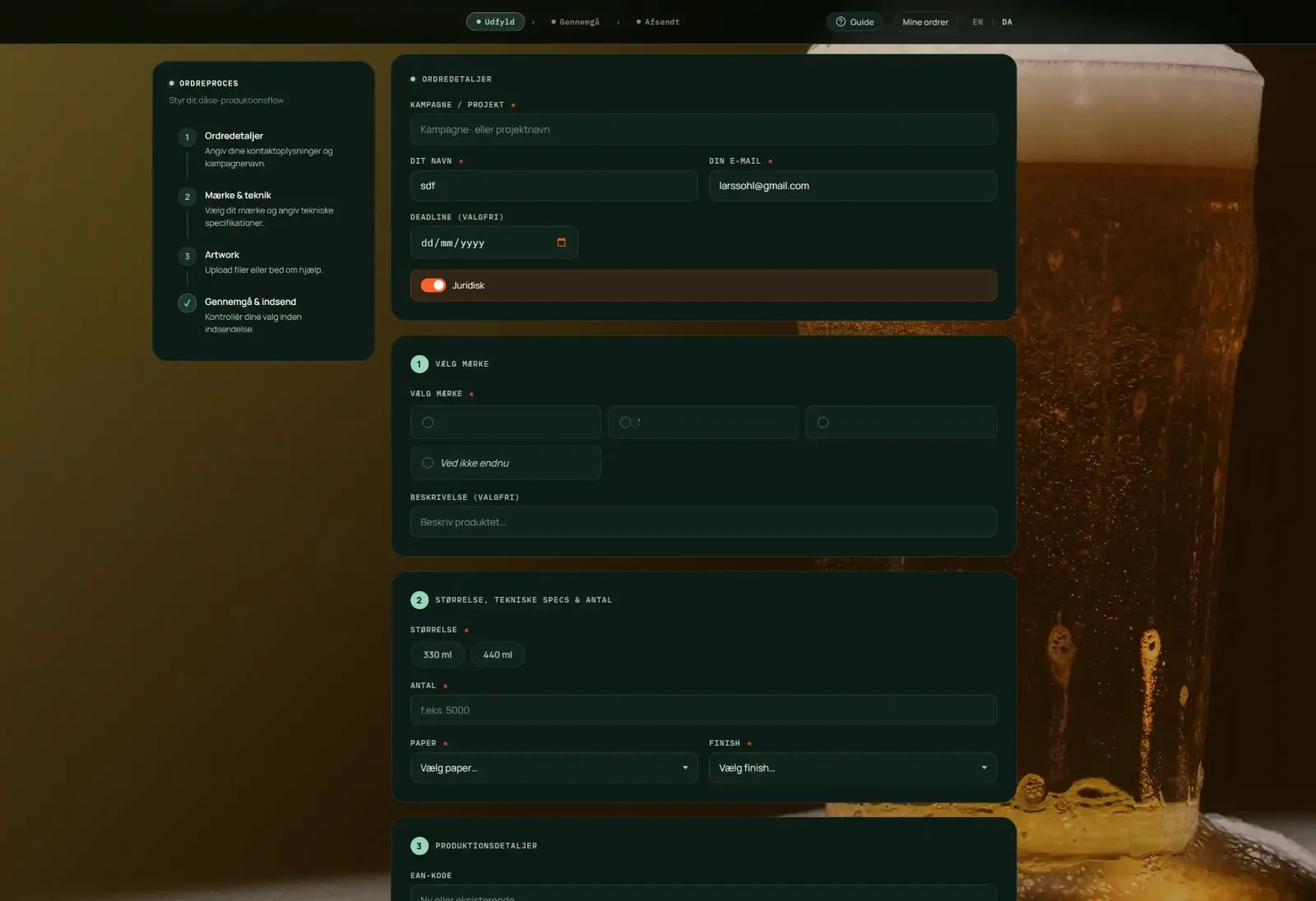
For an international brewing group, the process around label orders involves a lot of production details that need to be correct before anything can move forward. Brand, variant, label size, quantity, paper, finish, EAN, ingredients, nutritional information, artwork, deadlines and production files all have to be collected somewhere.
The problem wasn't that people couldn't fill in a form.
The problem was everything that happened around the form.
Missing information creates emails. Emails create questions. Questions create more emails. And suddenly a relatively simple label order becomes a small administrative project.
So instead of building another contact form, we built an actual application.
My role
I worked on the project from the idea and UX through design, development and implementation.
The goal was to make the front end feel almost ridiculously simple while building something much smarter underneath.
That meant thinking about two completely different users.
The customer should be able to create a label production brief without having to understand the system behind it.
The team at Brandsurface needs structured data, files, status information and a reliable workflow that can be managed after the order has been submitted.
So the job became less about designing a form and more about designing the entire digital process.
The solution
The result is a custom-built label production web app developed for an international brewing group.
The customer starts with the basics: campaign, project, name, email and deadline.
From there the application guides them through brand selection, product information and technical specifications. Available brands and variants are pulled from the database, so the form can change without rebuilding the application.
Technical information such as size, quantity, paper and finish is handled in dedicated steps. Production details such as EAN, energy information, ingredients and nutritional content are collected in a structured way.
There is also support for attaching reference documents and artwork files directly to the order.
And because production files can get big, the system can also generate a Smash upload option for larger files.
The important part is that everything ends up in one order.
Not five emails.
- Not a Dropbox folder with a mysterious filename.
- One structured production brief.
- The little detail that makes a big difference
- One of my favourite parts of the solution is what happens after the customer presses send.
Instead of immediately throwing the order over the wall, the system sends the customer a confirmation email with the complete order.
Then there is a short grace period. Changed your mind? Found a typo? Forgot an EAN number? Need to replace a file?
No problem.
The customer can reopen the order through the email, edit it and submit a new version.
Only when the grace period expires is the order automatically forwarded to Brandsurface.
That tiny piece of automation removes a surprisingly large amount of friction from the process. The technical implementation uses scheduled transactional emails and a revision-based workflow, so an edited order effectively replaces the previous version and restarts the timer.
And then there is the admin side
A customer-facing form is only half the job.
Behind the scenes I built a custom admin interface where Brandsurface can manage orders, customers, brands, variants, settings and production options.
The catalogue is data-driven, which means new brands and variants can be added without changing the application code.
There is also customer login functionality, order history and the ability to reuse previous briefs.
So the app isn't just a prettier way of sending an order.
It is a small production system.
Built as a proper web app
The application is built with Next.js 14 and React, with Supabase handling the PostgreSQL database and file storage.
Resend handles transactional emails, including customer confirmations and the delayed order forwarding, while Vercel hosts the application. The project uses Next.js server-side API routes to connect the different parts of the workflow.
- Why build an app when you could build a form? Because the hard part wasn't collecting the information. The hard part was everything around it.
- What happens when information is missing?
- What happens when the customer wants to change something?
- What happens when a file is too large?
- What happens when there are several brands and variants?
- What happens to the order after submission?
And who is going to manage all of that six months later?
That is where the difference between a form and a web application starts to show. This label production platform was built to handle the whole journey — from the first brief to the final handover. A good digital tool should quietly remove work.
This one does.
(The form cannot be demonstrated live, as the solution is subject to a confidentiality agreement)